Price backup as a service in four lines that follow how the costs arrive: a per-workload or per-user charge for licensing and management, a per-terabyte charge for the data you store, a visible charge for offsite and immutable copies, and a set allowance for recovery work such as restores, test restores and reporting. Then review the storage line every quarter and the whole price once a year.
That structure matters because backup costs do not stay where they were on the day the contract was signed. Clients add users and servers, retention gets longer, and immutable copies stay on disk for fixed periods. A flat price that looked healthy at onboarding can slowly turn into a service that loses money, which is the pattern we described in The MSPs Losing the Most Money on Backup Usually Don't Notice It at First.
What should an MSP backup price include?
A backup price should cover four things: the software licence, the stored data, the offsite and immutable copies, and the people who run restores and show that recovery works. Most pricing problems come from charging for the first two and absorbing the rest.
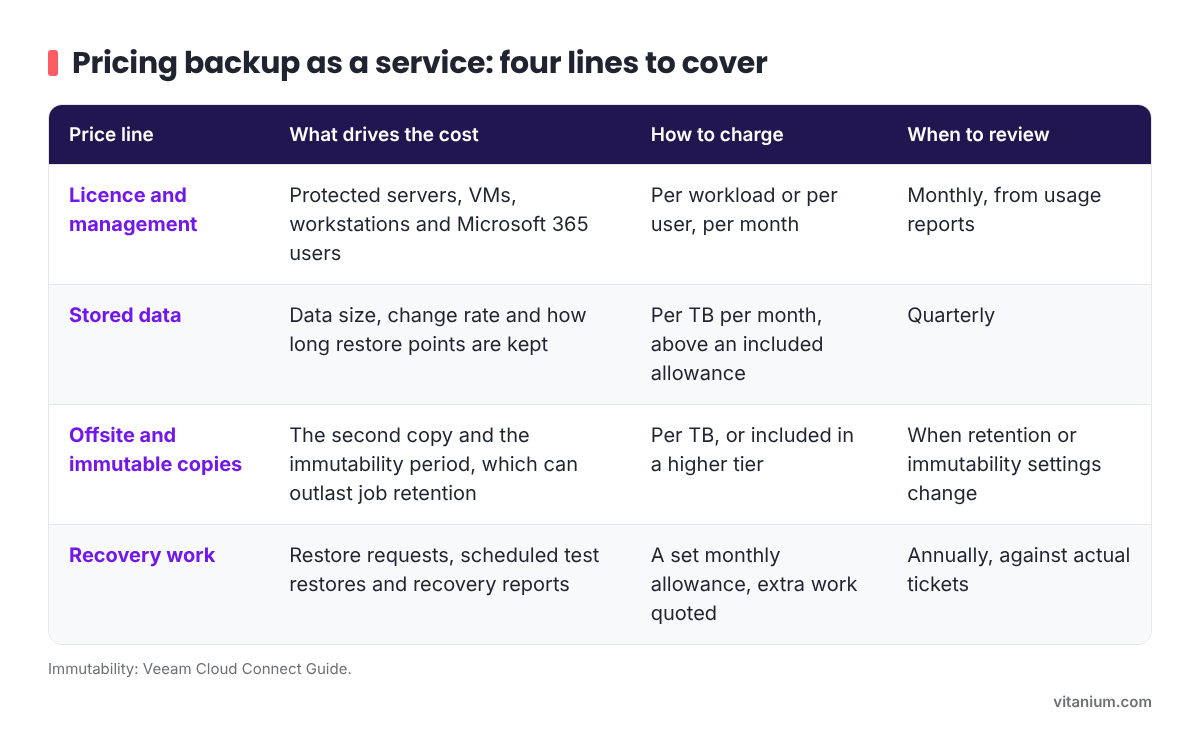
- Licence and management: driven by the number of protected servers, VMs, workstations and Microsoft 365 users. Charge per workload or per user, per month. Review monthly, from usage reports.
- Stored data: driven by data size, change rate and how long restore points are kept. Charge per TB per month above an included allowance. Review quarterly.
- Offsite and immutable copies: driven by the second copy and the immutability period, which can keep data longer than job retention. Charge per TB, or include it in a higher tier. Review whenever retention or immutability settings change.
- Recovery work: driven by restore requests, scheduled test restores and recovery reports. Include a set allowance each month and quote extra work. Review annually, against actual tickets.
Splitting the price this way also makes renewals easier. When a client asks why their bill has gone up, you can point to the line that grew instead of defending a single number.
Should you charge per device, per user or per terabyte?
Use all three, each for the part of the cost it tracks. Servers, VMs and workstations are best priced per protected workload, Microsoft 365 per user, and stored data per terabyte. This mirrors how the licensing underneath works, so your price moves in step with your own costs.
Two details are worth building in. Price servers above workstations, since they hold more data and take longer to recover. And for Microsoft 365, check the tenant for shared mailboxes and large SharePoint sites before you quote: they take storage without adding to the user count, so the per-TB line or an included allowance needs to cover them.
Pricing everything per terabyte is simple, but it hides the management cost of a client with many small machines. Pricing everything per device hides storage growth. Using each unit where it fits keeps both covered.
How do retention and immutability change the storage cost?
Longer retention and immutability both increase the storage you hold, and immutability can keep data for longer than the backup job's own retention setting. Price storage on what is actually held, not on the size of the client's servers.
Veeam's Cloud Connect documentation is clear about this. When a service provider uses a repository with immutability, tenant backups are not deleted until both the retention period and the immutability period have ended, so they can stay in the cloud repository for longer than the job settings suggest. A client on 14 days of job retention with a 30-day immutability period will keep about 30 days of restore points, not 14.
Immutability is worth having. It stops backups being deleted before the period ends, which is exactly what you want when ransomware or a compromised account goes after them, and we have written about why MSPs need it. The point is to make its cost visible. Show the immutability period on the quote and price the storage it creates, so a client who asks for longer protection understands why the storage line grows.
How do you price recovery, not just storage?
Include a defined amount of recovery work in the monthly price and say what it covers: routine restore requests, a scheduled test restore and a short recovery report. Anything beyond that is quoted separately or moves the client to a higher tier.
Recovery is where most of the hidden effort sits. Failed jobs need investigating, users ask for deleted files back, and a test restore takes engineer time even when it goes well. If none of that is in the price, the client sees backup as storage and the MSP carries the labour. A small included allowance, such as a set number of restore requests a month and one test restore a quarter, sets the expectation and gives you a fair point at which to charge.
It also changes what you are selling. A price that includes tested restores, with recovery times recorded against the client's RTO and RPO, is a recovery service. That is easier to defend at renewal than a storage bill, since a backup existing is not the same as being able to recover in the time the business needs.
Partners who make that shift describe it in the same terms. When TCS added Veeam Cloud Connect and Insider Protection with Vitanium, their aim was confidence for their customers "that they could recover from any situation, whether it was ransomware, accidental deletion or an insider threat."
How often should you review backup prices?
Review storage every quarter and the whole price once a year, and put both reviews in the contract. Licence usage is already counted monthly, so the licence line can follow it automatically.
Storage is the line that drifts. A quarterly look at each client's stored data against the allowance in their price catches growth before it becomes a year of absorbed cost. The annual review covers the rest: licence price changes from your suppliers, the time your team actually spent on restores, and general price rises. UK consumer price inflation was 3.6% in the 12 months to October 2026, according to the Office for National Statistics, so a price left unchanged for a year is already worth less than when it was agreed.
Write the review terms into the agreement from the start. A clause that lets you adjust the storage line when usage passes the allowance, and the whole price once a year, is much easier to use than a conversation about an increase the client did not expect.
Where does Vitanium fit in an MSP's backup price?
Vitanium supplies two of the four lines directly to MSPs: the offsite and immutable copies, through Veeam Cloud Connect, and the licence line, through Veeam rental licensing. Both are billed monthly, so the costs underneath your price move in the same rhythm as the price itself.
Our Veeam Cloud Connect service is UK-hosted offsite storage for Veeam environments, sold by plan size with monthly or annual billing, no egress fees and DR test support included. Immutable storage options and Insider Protection stop backup data being modified or deleted, so the immutability you charge for is actually in place. Veeam rental licensing is monthly pay-as-you-go, based on the usage you report, and our team helps with licence guidance and monthly usage reporting. Support for both comes from Veeam-accredited UK engineers.
Frequently asked questions
Should backup be included in a per-user managed services price?
It can be, but show it as its own line. When backup disappears inside a bundle, storage growth and recovery work are hard to see and harder to charge for later. A separate line, even within a bundle, lets you review it on its own terms and shows the client what they are paying for.
Should MSPs charge for restores?
Include a set number of routine restores in the monthly price and quote anything larger, such as a full server recovery or a recovery after a ransomware incident. Clients expect small restores to be covered. Large recoveries take hours of engineer time and should be priced as the project they are, with the terms agreed in the contract before they are needed.
Should server backup cost more than workstation backup?
Yes. Servers usually hold more data, change more often and take longer to recover, so they use more storage and more engineer time when something goes wrong. Price the difference rather than averaging it out across the estate.
How should an MSP price Microsoft 365 backup?
Per user per month, with a storage allowance. Per-user pricing is what clients expect, but shared mailboxes, SharePoint sites and Teams all take storage without adding users. Check the client's tenant for shared mailboxes and large SharePoint sites before you quote, so the price reflects what you will actually hold.
If you are reworking how you price backup, Sam can show you how Cloud Connect and rental licensing costs map onto each line of your price. Book 30 minutes with Sam.